Percepta Social App
Percepta Social was founded and created with the belief that parents should not have to spend hours every week stalking their teens on social media to know how they are presenting themselves to the world. Our app analyzes publicly posted content from Snapchat, Tiktok and Instagram and converts it to a single, simple score to indicate how teens are perceived online.
How Scoring Works

Step 1
Your teen enters their social media handles into the Percepta Social app. We support Instagram, Snapchat, and Tiktok. The app supports multiple handles for each platform and aggregates the results of the text, images, and video posted publicly under those handles.

Step 2
Our technology leverages the assistance of Google Gemini (Artificial Intelligence – AI) with special instructions provided about how to analyze the content. Some of the analysis instructions are shared in the app, but not all, because this is the foundation of our intellectual property.

Step 3
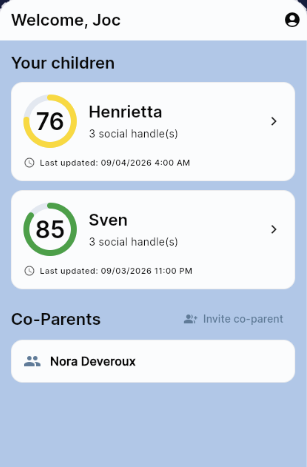
The AI performs the analysis and returns a score between 1 and 100 which is averaged with the user’s other scores. The numerical range has been separated into identifying bands to make the results clear.
What to Expect
Step One: Guardian App Install
Guardians (parents) download and install the app first.
Step Two: Fill User Info
You’ll be asked for: First and Last Name, zip code, mobile number, password, and optionally email address. Additionally, we collect the First Name and mobile number along with date of birth for all teens ages 13-17. If you have a referral code, you’ll enter that here too.
Step Three: The Legal Stuff
Next you’ll proceed to the terms of service and privacy policy acknowledgement.
Step Four: Subscription & Payment
The last step for guardians is to choose subscription options and enter payment details. The payment processor collects the associated billing address, but it is securely stored and kept separately with the card on file in the processor’s system.
Step Five: Teen App Install
Your teen(s) will then download the app while the guardians copy and paste the invitation code into a text message using the handy copy button found on their main page. This process links the teen to their guardian.
Step Six: Social Handles
The teen enters their social media handles during their activation, and everyone is up and running. The app informs users of the latest data refresh and next scheduled update which is associated with your subscription level.
Download and Install

Apple version coming soon